

 ChatGPT
 Claude
 Perplexity
 Gemini
The end-of-year break is nearly here. While you’re looking forward to some well-deserved time off, your website needs to keep working — or at least, not break while you’re away.
Many Australian businesses shut down operations during the holiday period, with closure dates varying by industry and company. Whether you’re closing for two weeks, three weeks, or longer, your website becomes your only employee during that time. If you’re running an ecommerce store that needs to keep ticking over, or a service business that just needs to keep the lights on digitally, here’s what you need to sort out before you close the door.
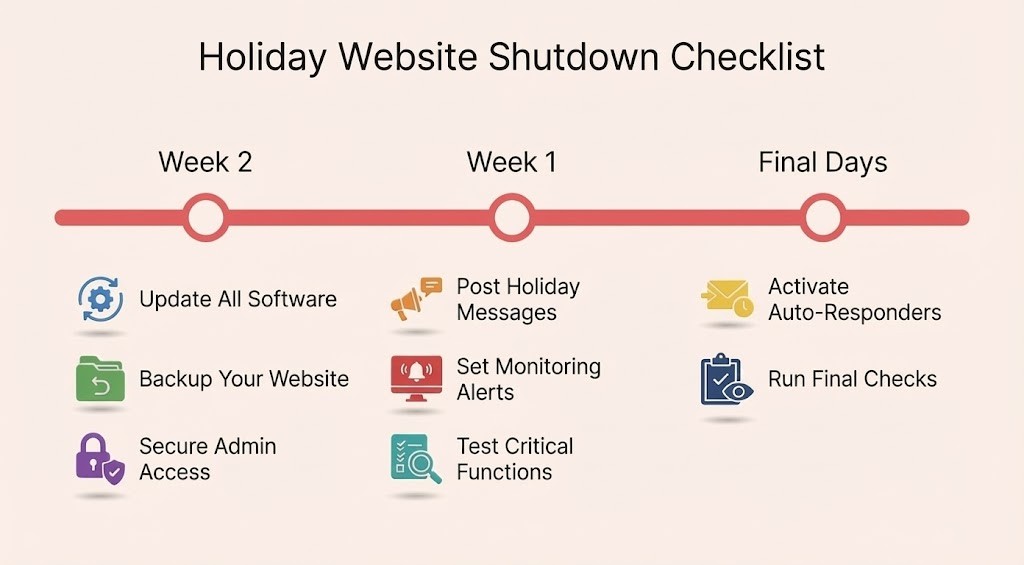
For Every Business Website
1. Set Up Your Holiday Messaging
Your website visitors need to know when you’ll be back. This sounds obvious, but you’d be surprised how many businesses forget this basic step.
What to do:
- Add a banner or notification to your homepage announcing closure dates
- Update your contact page with shutdown dates
- Include an expected response time: “We’ll respond to all enquiries from 12 January onwards”
- Update Google Business Profile with holiday hours
- Set up email auto-responders with closure dates and support contact: support@[yourdomain]
The key is visibility. Don’t bury this information three pages deep. Make it impossible to miss.
2. Back Up Everything
Before you switch off for the holidays, back up your entire website. Server failures don’t respect holiday schedules, and you don’t want to spend Boxing Day troubleshooting from your phone.
If you’re hosting with Spark Interact: We’ve got you covered. All our hosting clients have automated backups configured for both website files and server data. Your backups are ready and tested — one less thing to worry about over the break.
If you’re managing your own hosting:
What to back up:
- Full website files and databases
- Email server data
- Customer databases
- Order history and transaction records
- Any custom configurations or settings
Store backups in at least two locations — ideally including cloud storage that you can access remotely if needed. Test that you can actually restore from these backups. A backup you’ve never tested is just wishful thinking.
3. Update All Software and Plugins
The holiday period is prime time for security vulnerabilities. Hackers know that many businesses aren’t actively monitoring their systems, making it an attractive window for attacks.
Before you close:
- Update your CMS (WordPress, Drupal, etc.) to the latest version
- Update all plugins and extensions
- Update SSL certificates if they’re due to expire
- Check that security patches are applied
- Remove any unused plugins or themes
Do this at least a week before the shutdown. This gives you time to catch any issues the updates might cause while you still have the capacity to fix them.
4. Monitor Uptime (Even When You’re Off)
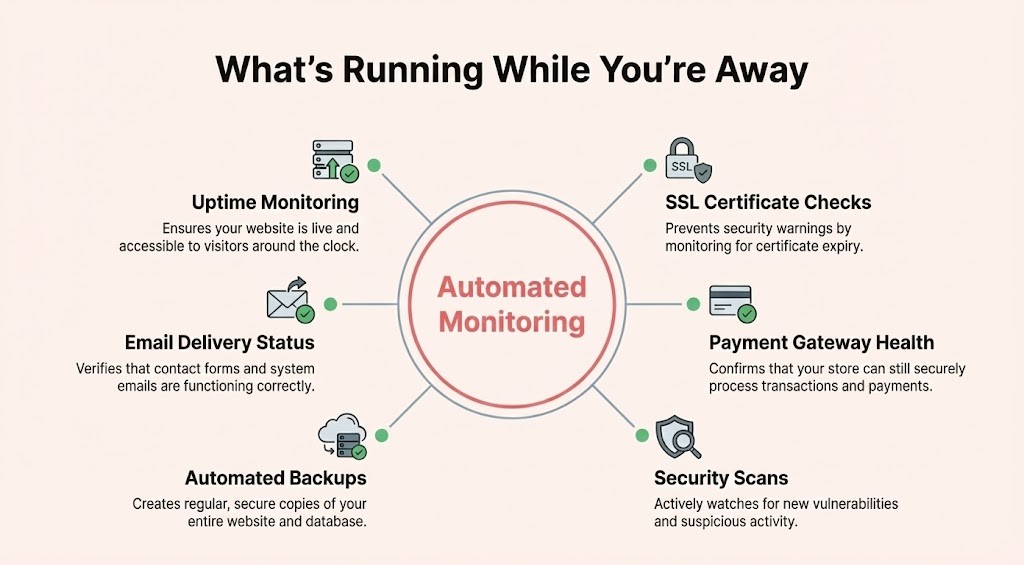
Your website might be the only part of your business that’s “working” over the break, so you need to know if it goes down.
Set up monitoring for:
- Website uptime (use tools like Uptime Robot or Pingdom)
- SSL certificate expiry
- Domain registration expiry
- Payment gateway functionality (for e-commerce)
- Form submissions and email delivery
Configure alerts to go to someone who’s actually available during the shutdown period. If you’re completely off-grid, consider a monitoring service that includes emergency response.
5. Secure Your Admin Access
If you’re not actively using your website, nobody else should be either.
Security steps:
- Enable two-factor authentication on all admin accounts
- Review user access and remove any unnecessary accounts
- Check for suspicious activity in recent login logs
- Consider temporarily limiting admin access to specific IP addresses
- Update all admin passwords before you leave
6. Test Critical Functions
Don’t wait until you’re at the beach to discover that your contact form stopped working.
Test these before you go:
- Contact forms (submit a test and confirm it arrives)
- Payment processing (if applicable)
- Email delivery
- Mobile responsiveness
- Page load speeds
- Search functionality
- Shopping cart (for e-commerce sites)
Fix any issues now, while you have the time and mental bandwidth to deal with them properly.
For E-commerce Websites
Running an online store over the holidays requires more planning. Your website isn’t just a brochure — it’s actively processing orders and taking payments.
7. Decide: Open or Closed?
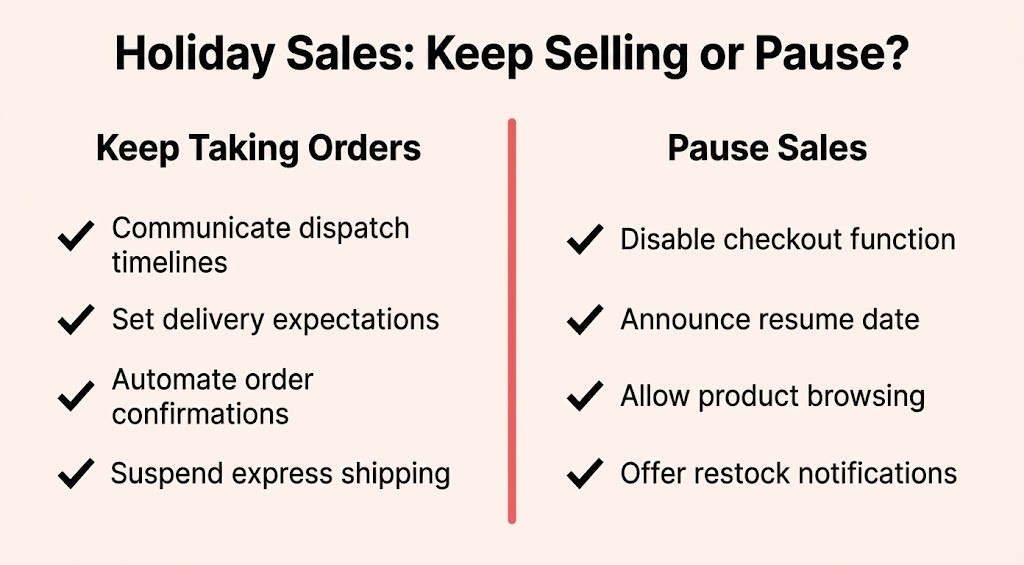
First, determine whether you’ll continue taking orders during the shutdown or pause ecommerce operations entirely.
Option A: Keep Taking Orders
- Clearly communicate dispatch timelines: “Orders placed during our holiday shutdown [insert your dates] will be dispatched from [return date]”
- Update product pages with realistic delivery expectations
- Set up automated order confirmation emails with shutdown information
- Consider suspending “Express Shipping” options to avoid disappointed customers
Option B: Pause Online Sales
- Temporarily disable checkout functionality
- Add clear messaging: “Online ordering will resume [return date]”
- Keep product browsing available so customers can prepare orders
- Consider offering a “notify me” function for when sales resume
There’s no right answer here — it depends on your inventory, logistics, and whether you can actually fulfil orders. At Spark Interact, we’re closing 19 December to 11 January but still monitoring emails for urgent matters — each business needs to find the approach that works for their operations and customer expectations.
8. Manage Your Inventory
Nothing frustrates customers more than ordering something that isn’t actually available.
Before shutdown:
- Update stock levels to reflect what’s actually available
- Mark low-stock items clearly
- Consider disabling products you can’t ship until January
- Update supplier lead times on your system
- Ensure your inventory management system is accurate
If you’re continuing to take orders, build in buffer stock. The last thing you want is to return from your break to discover you oversold popular items.
9. Prepare for the Return Rush
The first week back often brings a surge in activity — both from holiday shoppers and from customers who have been waiting for you to reopen.
Set up systems for:
- Priority handling of orders placed during the shutdown
- Batch processing for accumulated enquiries
- Clear communication about queue times
- Automated status updates for waiting customers
Consider staggering your “return to normal service” across a few days rather than trying to process everything on your first day back.
10. Payment Systems and Subscriptions
If you’re running subscription services or recurring payments, you need to think about what happens during the shutdown.
Check:
- Whether automatic renewals will process
- How you’ll handle payment failures during the shutdown
- Subscription cancellation requests that come in while you’re away
- Whether your payment gateway requires any action
- That your merchant account won’t flag unusual patterns as suspicious
Payment providers can be sensitive to changes in transaction patterns. Give them advance notice if you’re expecting a significant drop or spike in activity.
11. Returns and Customer Service
Returns don’t stop just because you’re closed. Neither do customer questions.
Prepare for:
- Returns that arrive during the shutdown period
- Customer service enquiries piling up
- Disputes and refund requests
- Delivery issues and lost packages
Update your returns policy to reflect the shutdown: “Returns received during [your shutdown dates] will be processed from [return date].” Set clear expectations so customers know when to expect resolution.
Consider setting up an FAQ or knowledge base that addresses common holiday questions, reducing the support burden when you return.
12. Watch for Fraud
Holiday periods see increased fraudulent activity, and automated systems might not catch everything.
Before you leave:
- Review fraud detection settings in your payment gateway
- Set stricter thresholds for flagging suspicious orders
- Consider temporarily disabling high-risk payment methods
- Check that your fraud monitoring service is active
- Review recent orders for any unusual patterns
If you’re completely offline, arrange for someone to at least check flagged transactions periodically.
Technical Housekeeping
13. Hosting and Performance
Your hosting provider needs to know you’re expecting different traffic patterns.
Contact your host about:
- Expected traffic changes (up or down)
- Whether auto-scaling is configured correctly
- Server monitoring during the shutdown period
- Emergency contact procedures
- Scheduled maintenance windows
If you’re on a shared hosting plan and expecting significant traffic, consider temporarily upgrading to handle the load. The cost of upgrade is negligible compared to lost revenue from a crashed site.
14. Content Updates
Remove anything time-sensitive that might become inaccurate during the shutdown.
Review and update:
- Blog posts mentioning current dates or “recent” events
- Promotional banners for time-limited offers that expire during the break
- Team member status or availability
- “Latest news” sections
- Event calendars
15. Analytics and Reporting
Set up reports to capture what happens while you’re away, so you’re not flying blind when you return.
Configure:
- Automated weekly performance reports
- Transaction summaries
- Traffic pattern reports
- Conversion rate tracking
- Error and downtime alerts
This gives you a clear picture of what happened during the shutdown without requiring active monitoring.
Getting Ready to Reopen
16. Plan Your Return
The work doesn’t end on 12 January. You need a clear plan for resuming normal operations.
Create a reopening checklist:
- When will you process the backlog of orders?
- Who handles the accumulated customer enquiries?
- How quickly can you resume normal dispatch times?
- What’s your communication plan for waiting customers?
- Do you need extra hands for the initial rush?
Consider a soft reopening: maybe you start processing orders on your first day back but don’t heavily promote your return until you’ve cleared the backlog.
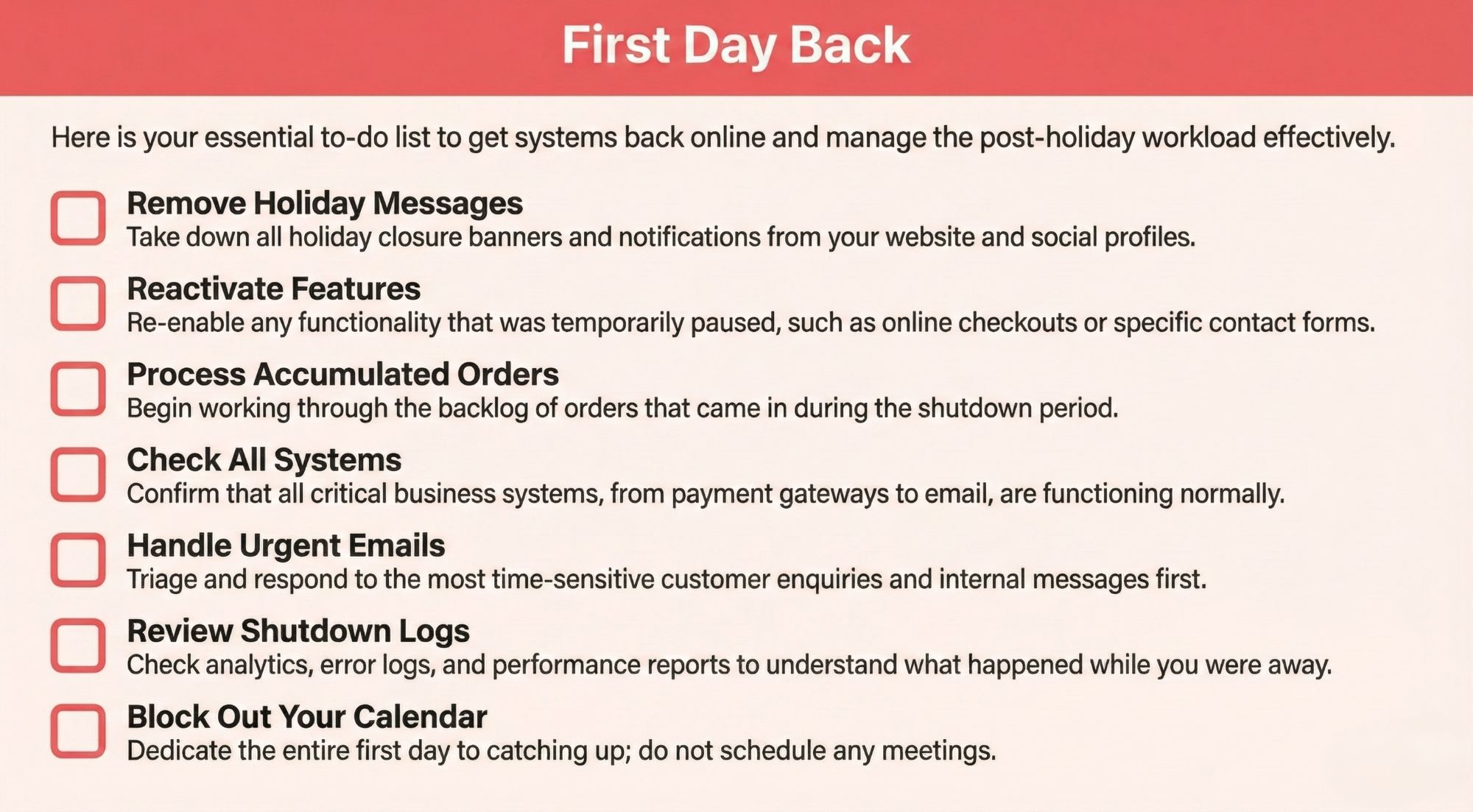
17. First Day Back Actions
On your first day back, you’ll need to:
- Remove all holiday shutdown messaging from your website
- Reactivate disabled features (if any)
- Process any orders that accumulated
- Respond to enquiries in order of urgency
- Check that all systems are functioning normally
- Review what happened during the shutdown
Set aside the entire first day for this catchup work. Don’t schedule client meetings or expect to jump straight into new projects.
18. Post-Holiday Review
Once you’re back in the swing of things, review how the shutdown went.
Assess:
- Did anything break?
- How well did your automated systems work?
- What took longer than expected to resolve?
- What would you do differently next year?
- Were customer expectations managed well?
Document what worked and what didn’t. Next year’s shutdown will be much smoother with these lessons captured.
The Support Safety Net
Even with perfect planning, things can go wrong. Make sure someone can help if disaster strikes.
Before your shutdown:
- Document how to access critical systems
- Create a list of emergency contacts (hosting provider, domain registrar, payment gateway)
- Decide who has authority to make emergency decisions
- Keep login credentials secure but accessible to authorised people
- Test your emergency contact procedures
If you truly can’t monitor anything during the break, consider hiring a service to provide emergency coverage. For businesses where the website is mission-critical, this peace of mind is worth the investment.
A Note on Our Holiday Operations
At Spark Interact, we’re also taking a break from 19 December to 11 January. But we know websites don’t take holidays, so we’ll still be monitoring [email protected] throughout this period.
If something critical breaks — your website goes down, security issue, payment processing failure — email us with “URGENT” in the subject line. We’ll be there. For non-urgent matters, we’ll respond to emails as we can, though response times will be longer than usual.
If you’re hosting with us, your automated backups and server monitoring continue running 24/7 throughout the break. One less thing to worry about while you’re off.
We’re also accepting new enquiries over the holiday period. Thinking about a website project for the new year? Get in touch at [email protected] and we’ll follow up when we’re back.
Visit our helpdesk for support resources.
Final Thoughts
The holiday shutdown doesn’t have to be stressful. With proper planning, your website can either keep working smoothly or rest peacefully until you return — whichever you choose.
Start this checklist now, not the day before you close. The things that seem quick and easy have a habit of taking longer than expected, and you don’t want to be troubleshooting website issues when you should be at the Christmas party.
If you’re looking at this list and feeling overwhelmed, that’s a sign you might need help. Whether it’s a pre-holiday website health check, backup verification, or just peace of mind that everything’s sorted, we’re here. Email [email protected] — even though we’re closing 19 December to 11 January, we’re still monitoring emails for support matters throughout the break.
Now go enjoy your break. Your website will be fine.